
Most LinkedIn connection message examples promise the same thing: copy this, swap in a name, watch replies come in. Some of that advice holds up. Some of it falls apart the moment you look at what actually happens after a request gets sent — which is exactly what a study covering over 11.5 million requests set out to measure.
This guide takes a different approach: five complete, data-backed examples first, then the reasoning behind why each one works, then what that study actually found about personalization and reply rate. What separates a message that gets a reply from one that just gets accepted, and where doing this by hand starts to break down.
5 LinkedIn Connection Message Templates Worth Actually Using
Most template lists solve personalization with a fill-in-the-blank: Hi [Name], I see we're both into [Interest]... – a structure to copy, with a placeholder standing in for the specific detail. These five are built differently: each one is a complete example rather than a blank to fill in, because the point isn’t the sentence shape, it’s what’s actually true in each one.
Example 1: The Recent-Post Reference
Hi Priya,
Your post on shortening the SDR ramp-up period this week matched something I’ve been thinking through for our own team. Would be glad to trade notes if you’re open to it.
Best, [Your Name]
Example 2: The Current-Role Reference
Hi Marcus,
Saw you’re leading Revenue at Clearline – I would like to know how outreach priorities are shaping up on your end these days, if you’re open to a quick note back.
Best, [Your Name]
Example 3: The Hiring-Signal Reference
Hi Dana,
Saw the post about your team looking for a senior data analyst – that kind of hire usually means the reporting stack is about to get a lot more scrutiny. Happy to share what’s worked for teams in a similar spot.
Best, [Your Name]
Example 4: The Shared-Space Reference
Hi Tom,
We’re both building in the B2B SaaS space and I thought it’d be worth connecting to trade notes – always good to compare what’s actually working with people in the same boat.
Best, [Your Name]
Example 5: The Short, Binary Ask
Hi Elena,
Quick one – are you still handling outbound strategy at Verve, or has that shifted to someone else on your team?
Best, [Your Name]
None of these are meant to be copied verbatim – doing that would just recreate the same fill-in-the-blank problem most LinkedIn connection request templates have. They’re a pattern to build from, not scripts. The specific detail in each one has to come from whatever’s actually true about the person being messaged.
Why These Templates Actually Work
Every template above follows the same underlying rule: reference something that could only be true about this one person, not something plausible-sounding that could describe anyone. “I came across your profile and wanted to connect” could apply to any LinkedIn connection request message ever sent. “Your post on shortening the SDR ramp-up period” could only apply to Priya.
That specificity does two things a generic opener can’t. First, it signals the message wasn’t sent to a list – the reader can tell, almost instantly, whether a note reads as generic or specific, and reacts accordingly. Second, it sets up the actual conversation. A blank request that gets accepted starts from zero. A note like the ones above gives the recipient a reason to engage with whatever comes next, before it even arrives.
This is also where most LinkedIn connection request templates quietly fail. A template with a blank stays structurally identical no matter what gets filled in – a hundred people can use the exact same shape, and prospects notice that shape long before they notice the specific words inside it.
The Data Behind Why Personalization Pays Off
Belkins’ 2026 study, tracking over 11.5 million LinkedIn connection requests sent in 2025, found something more specific than “personalize everything”: requests without a note actually get accepted slightly more often – 27.6% versus 25.3% for requests with a note – but requests with a note see a 55% higher reply rate once accepted (8.2% versus 5.3%).
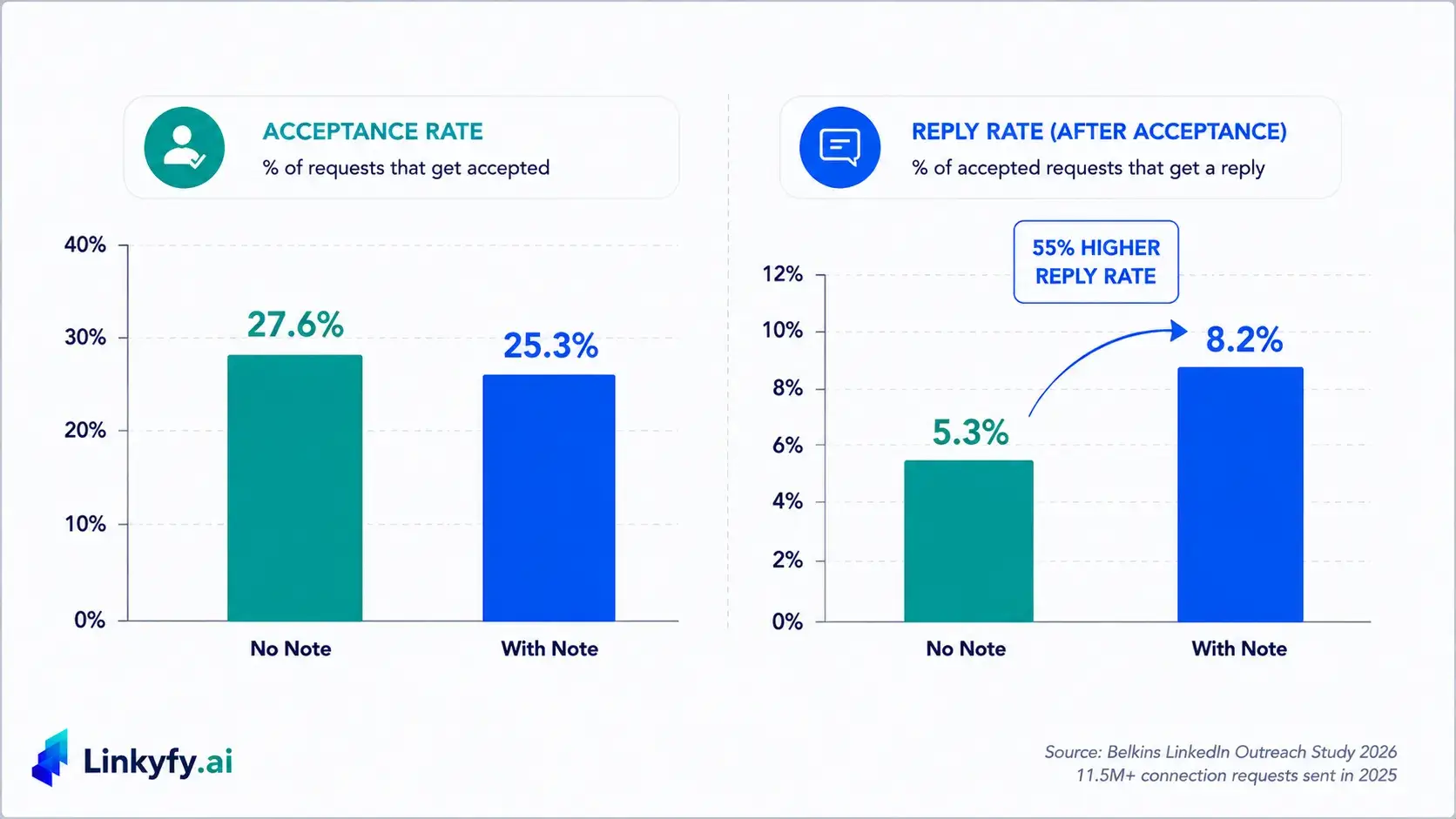
That reframes what LinkedIn outreach templates are actually for. A note costs a little acceptance and pays back a lot of reply. Blank requests carry less friction – nothing to read, nothing to evaluate, nothing to reject before clicking Accept. But acceptance was never the goal that mattered on its own; it’s the entry point, not the outcome. The same study’s broader numbers back this up: average reply rate across all LinkedIn outreach sits around 7%, and within a standard connect-then-message workflow, roughly half of replies come from the first touch and half from the follow-up: meaning the note isn’t carrying the whole conversation, but it’s setting the tone for everything that follows it.
So the takeaway isn’t “always personalize” or “acceptance doesn’t matter.” It’s that LinkedIn outreach templates built to maximize acceptance and templates built to maximize reply are optimizing for two different things, and most advice collapses them into one.
Where This Breaks Down Doing It by Hand
Five examples are manageable for five messages. They stop being manageable somewhere around message thirty, because each one requires actually reading a profile, finding what’s specific about it, and writing a note that reflects it – not filling in a blank, which is the whole reason blanks got popular in the first place.
Here’s what that looks like over a normal week. Reading a profile closely enough to find one genuinely specific detail takes a couple of minutes, even for someone practiced at it. Multiply that by a list of a hundred prospects, and personalizing all of them by hand is most of a working day gone before a single reply comes back. Most people don’t consciously decide to stop personalizing at that point – they just start writing faster, the details get vaguer, and three weeks later the notes look like the same fill-in-the-blank LinkedIn connection request message the whole approach was supposed to avoid.
Scaling This With LinkedIn Outreach Automation
This is the actual gap Linkyfy is built to close: not by templating the message, but by generating it fresh for every prospect on a list, not just the five someone had time to personalize by hand before running out of the afternoon. The mechanism is the same one behind each example above – reading what’s actually true about a profile and writing from it – just running at a pace no single person reading profiles manually could sustain.
Linkyfy is a privacy-first LinkedIn outreach tool built for founders, CXOs, and sales professionals who want every connection message and follow-up built from real profile signals instead of a template, running within safe daily limits so the same trade-off holds at scale, not just for the first five messages.
See what a connection message built from a real signal actually looks like – start free at linkyfy.ai.
Frequently Asked Questions
Why should you personalize connection requests on LinkedIn?
Personalizing a LinkedIn connection request means referencing something specific and true about the person you’re reaching out to, rather than sending the same generic note to everyone. This shows genuine interest, makes the message read like it was actually written for that person, and significantly increases the chances of getting a reply once the connection is accepted.
Do you need to send a note when connecting on LinkedIn?
Not strictly, but it depends what you’re optimizing for. A blank request gets accepted slightly more often than one with a note. A request with a specific, personalized note sees a 55% higher reply rate once accepted – so skipping the note trades a small acceptance edge for a much larger reply-rate loss.
What actually predicts a good connection acceptance rate?
Profile credibility, mutual connections, and shared context tend to matter more than message wording. A note does carry a small acceptance cost compared to a blank request, but the difference is modest next to what profile and network factors contribute.
What makes a connection request note actually effective, not just personalized?
Specificity, not the presence of a name or company field. A note that could plausibly describe anyone – “loved your content,” “we’re both in tech” – reads the same as no note at all to most recipients. A note built from something only true about that specific person is what actually earns the reply-rate lift.
Does the same logic apply to cold email reply rate?
Yes. Emails built from real, specific signals tend to outperform generic templates primarily in reply rate, not open rate – the same pattern seen in LinkedIn’s note-vs-no-note data, where the specific detail matters more once someone is already engaging.
