
Most advice on building an AI outreach engine assumes a team big enough to build the safety infrastructure themselves — seat rotation, audit logs, a compliance layer sitting on top of whatever tool is actually sending messages. That’s a reasonable answer for a 50-person sales org.
It’s not a realistic one for a founder, a two-person team, or an agency managing a handful of client accounts. For teams that size, the real choice usually comes down to sending more and hoping the account survives, or building compliance infrastructure nobody has the headcount for.
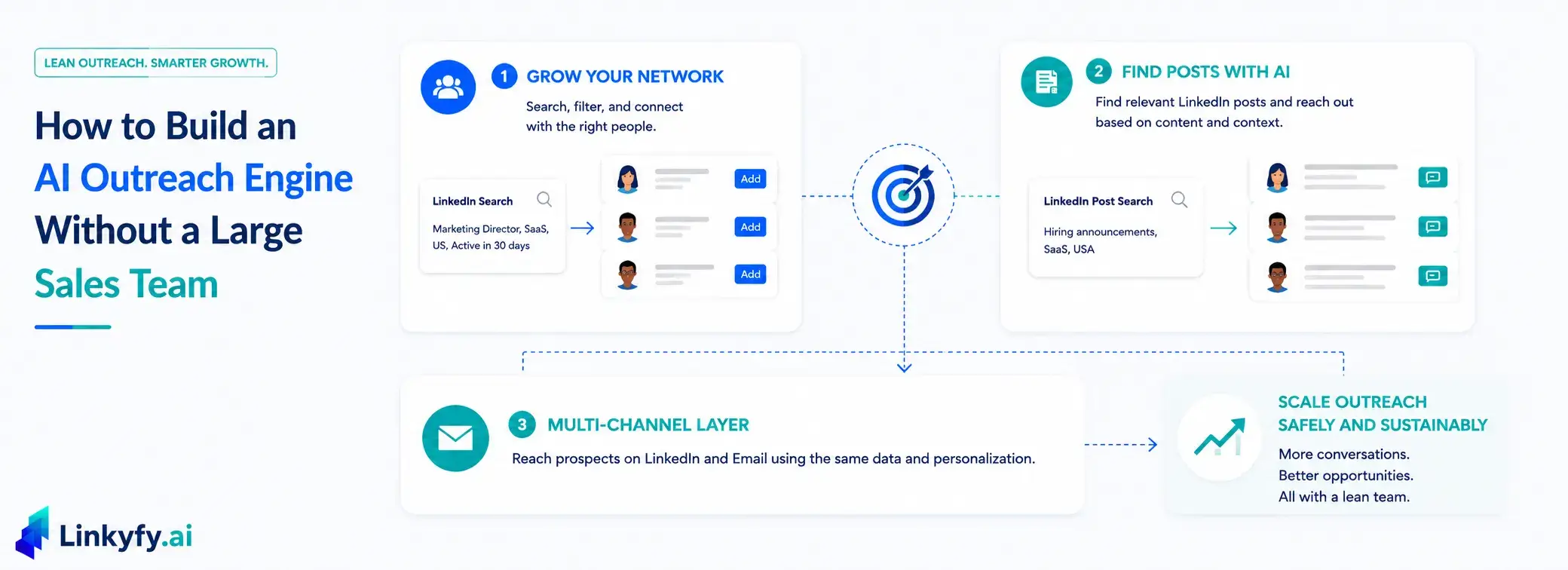
That risk is real, not hypothetical: Growleads’ 2026 ban risk analysis found that roughly 23% of teams using automation face a LinkedIn restriction within 90 days, largely tied to how aggressively — and carelessly — that scaling happens. This guide breaks down a third option: two core features, Grow Your Network and Find Posts with AI (LinkedIn Post Finder), plus a shared multi-channel layer, that scale outreach without either extreme — using built-in pacing and eligibility safeguards instead of a separate guardrail layer someone has to build and maintain.
Grow Your Network: The Search-Filter Feature
This is the baseline most outreach starts with, and it holds up well precisely because the safety logic is built into the feature rather than bolted on afterward.
A LinkedIn Search URL built around an ideal customer profile. – job title, industry, recent activity – feeds into AI filtering that narrows a broad list down to the people actually worth reaching. Prospects sourced elsewhere can be brought in the same way, through an imported CSV instead of a search URL. Each of those prospects gets a connection message built from real profile signals, not a template, and the request goes out within smart daily caps – 15 – 20 connection requests a day, with randomized delays between actions to avoid looking automated.
The reason Grow Your Network scales without breaking is that the safety logic isn’t a separate set of AI outreach guardrails a team has to configure and monitor – it’s the default behavior baked into the feature itself. A team running this across multiple prospect lists isn’t multiplying risk with each new list, because every list runs through the same safety logic regardless of who’s managing it.
Find Posts with AI: The Post-Search Feature
Grow Your Network scales a fixed prospect list built from filters. Find Posts with AI scales differently: the user provides a URL for a search of relevant LinkedIn posts, and Linkyfy finds the relevant posts within it and reaches out based on each post’s content and the poster’s profile data, rather than working from a static filtered list that eventually runs dry.
Instead of building a list from profile filters, this feature starts from a search of relevant LinkedIn posts – hiring announcements, industry discussions, anything that signals a current need. Linkyfy reviews the matching posts and reaches out to the people who wrote them, with each message personalized from the post’s content and the poster’s profile.
Running this feature against a fresh post search periodically, rather than once, keeps the prospect supply renewing instead of exhausting a single list – a pattern that fits naturally into a lean outreach workflow that runs continuously rather than in one-off batches.
The Multi-Channel Layer That Powers Both
Grow Your Network and Find Posts with AI both hit the same ceiling eventually – a growing share of prospects, regardless of how they were sourced, simply won’t respond on LinkedIn no matter how well-paced the outreach is. Multi-channel outreach isn’t a third, separate feature sitting alongside these two. It’s a layer that applies to whichever one is running, since both work from the same prospect and personalization data.
Whether a prospect came from a Grow Your Network list or a Find Posts with AI search, a built-in email finder can surface a verified professional email for them, and an AI-personalized email – built from the same profile signals as the original LinkedIn message – reaches them through a second channel. Every email is pre-verified before sending, keeping bounce rates below 3% and protecting the sending domain’s reputation. Reply rates tend to hold up well too, since the email isn’t a second, disconnected campaign – it’s built from the same signals as the LinkedIn message that came before it. This is the exact mechanism a full LinkedIn-then-email sequence runs on, covered in more depth in a separate piece.
This is where a lot of scaling attempts quietly fail: teams add email volume through a completely separate tool, with no shared data and no coordinated pacing between the two channels. Scaling that way multiplies the number of things that can go wrong. Because multi-channel here draws from the same list and the same personalization data as whichever feature sour
Grow Your Network vs. Find Posts with AI, at a Glance
| Features | Grow Your Network | Find Posts with AI |
|---|---|---|
| Starting point | LinkedIn Search URL or imported CSV (job title, industry) | Search of relevant LinkedIn posts |
| What it scales | A fixed prospect list | The supply of relevant prospects |
| Built-in safety | Smart daily caps, randomized pacing | Account eligibility check applies the same way |
| Best for | A defined ICP with clear filter criteria | A list that would otherwise run dry |
| Multi-channel layer | Available on top, same personalization data | Available on top, same personalization data |
Why These Two Actually Hold Up
What connects Grow Your Network, Find Posts with AI, and the multi-channel layer isn’t a shared feature name – it’s that none of them require a team to build a separate safety layer to keep them within bounds. The account eligibility check that runs before automation activates, the daily caps, and the randomized pacing apply the same way regardless of which feature is running or how many prospect lists are active at once.
That’s the practical difference between “scaling outreach” and safe outreach scaling done deliberately. The first just means sending more – and sending fewer, better-targeted messages often outperforms it anyway. The second means the system doing the sending doesn’t need a bigger team behind it to stay within safe limits as volume grows.
Scale isn't the problem. Scaling without pacing is.
Scaling outreach safely without a dedicated compliance team requires the safety logic - daily caps, randomized pacing, account eligibility checks - to be built into the feature itself rather than layered on separately. Linkyfy.ai supports this through two core features: Grow Your Network, a search-filter-based LinkedIn feature with smart daily caps (15–20 requests/day), and Find Posts with AI (LinkedIn Post Finder), which builds prospect lists from relevant LinkedIn posts rather than static filters. A multi-channel layer combining LinkedIn with a built-in, pre-verified email finder (bounce rates kept below 3%) applies to both.
Frequently Asked Questions
What does it mean to scale outreach safely without extra compliance tooling?
It means the pacing, daily limits, and account safeguards are part of how the outreach workflow itself runs, rather than a separate system a team has to configure and monitor on top of it. Safety scales automatically with volume instead of requiring more oversight as volume grows.
What are the benefits of using multiple communication channels for outreach?
A second channel raises the ceiling on how many prospects can realistically be reached, since a growing share of any list won’t respond on the first channel regardless of pacing. It also means a prospect isn’t lost just because one channel didn’t work – they’re reached wherever they’re actually likely to respond. That is where Linkyfy’s multichannel outreach comes in.
How is Find Posts with AI (LinkedIn Post Finder) different from a normal prospect list for scaling purposes?
A profile-filtered list from Grow Your Network is fixed in size and eventually gets exhausted. Find Posts with AI works from fresh searches of relevant posts, so the prospect supply renews itself instead of running out – which changes how “scaling” behaves over time.
What are common reasons for LinkedIn restrictions?
The most common factors are volume that ramps up faster than an account’s history supports, messages generic enough to read as templated, inconsistent pacing between actions, and a new or thin account running at the same volume as an established one. None of these are officially published by LinkedIn, but they’re the pattern most safety-focused workflows are built to avoid.
In Linkyfy, do Grow Your Network, Find Posts with AI, and the multi-channel layer require separate tools to run together?
No. In Linkyfy, all three run from the same underlying prospect and personalization data inside one platform, which is part of why they scale without multiplying coordination overhead the way three separate point tools would.
