
A connection request goes out. It gets accepted. Maybe there’s even a short exchange. Then, silence — not because the prospect lost interest, but because they simply don’t live in their LinkedIn inbox the way they live in their email.
Most tools never account for that. They’re built around one channel, and the moment that channel goes quiet, the campaign quietly dies with it. What follows is the actual mechanics of a sequence built to survive that moment — LinkedIn first, email right behind it, both drawing from the same source of truth about who the prospect actually is.
Most multi-channel advice solves this with a sending calendar instead — day 1 email, day 3 LinkedIn, switch channels on day 7. That calendar exists because separate tools don’t share prospect data, so timing rules are the only thing holding the sequence together. This guide skips the calendar entirely: no enrichment layer, no separate research step, just LinkedIn and email pulling from the same live profile signals.
Learn how Linkyfy runs both channels from one connected workflow — without a spreadsheet in sight.
Why Most Outreach Sequences Stop at One Channel
LinkedIn-only tools hit a hard ceiling the moment a prospect stops responding on LinkedIn. Some automate a handful of follow-up messages within the platform and stop there – meaning if a prospect never checks LinkedIn again, the sequence simply ends. Pure cold email tools have the opposite problem: they personalize from whatever’s in an uploaded CSV, with no live signal about who the prospect actually is beyond a name and company field.
Neither approach reflects how people actually communicate. Some prospects live in their inbox. Some barely open LinkedIn outside of a job search. Channel preference isn’t something a sequence can guess – it can only be tested, one channel at a time, in the right order.
Why Most Multi-Channel Advice Is a Calendar, Not a System
Most guidance on this topic reduces to a sending calendar: touch on day 1, touch on day 3, switch channels on day 7, and so on – with rules layered on top for when to pause, when to escalate, and when to bring in a human. That calendar exists to solve a specific problem: the LinkedIn tool and the email tool don’t share any information, so timing rules and manual handoffs are the only thing holding the sequence together.
That’s a workaround, not a fix. If the two channels were actually pulling from the same source of truth about a prospect, most of that scheduling complexity wouldn’t need to exist in the first place. The question worth asking isn’t “what’s the ideal day to switch channels” – it’s “why do LinkedIn and email need separate research and personalization steps at all, when they’re reaching the same person.”
One Prospect, One Data Source, Two Channels
Here’s the mechanism this sequence actually runs on, without a day-by-day calendar attached to it:
- Finding who to reach. It starts with a LinkedIn Search URL built around an ideal customer profile – job title, industry, recent activity. AI filtering narrows that down to the prospects worth reaching, not a raw export of everyone who matched a keyword.
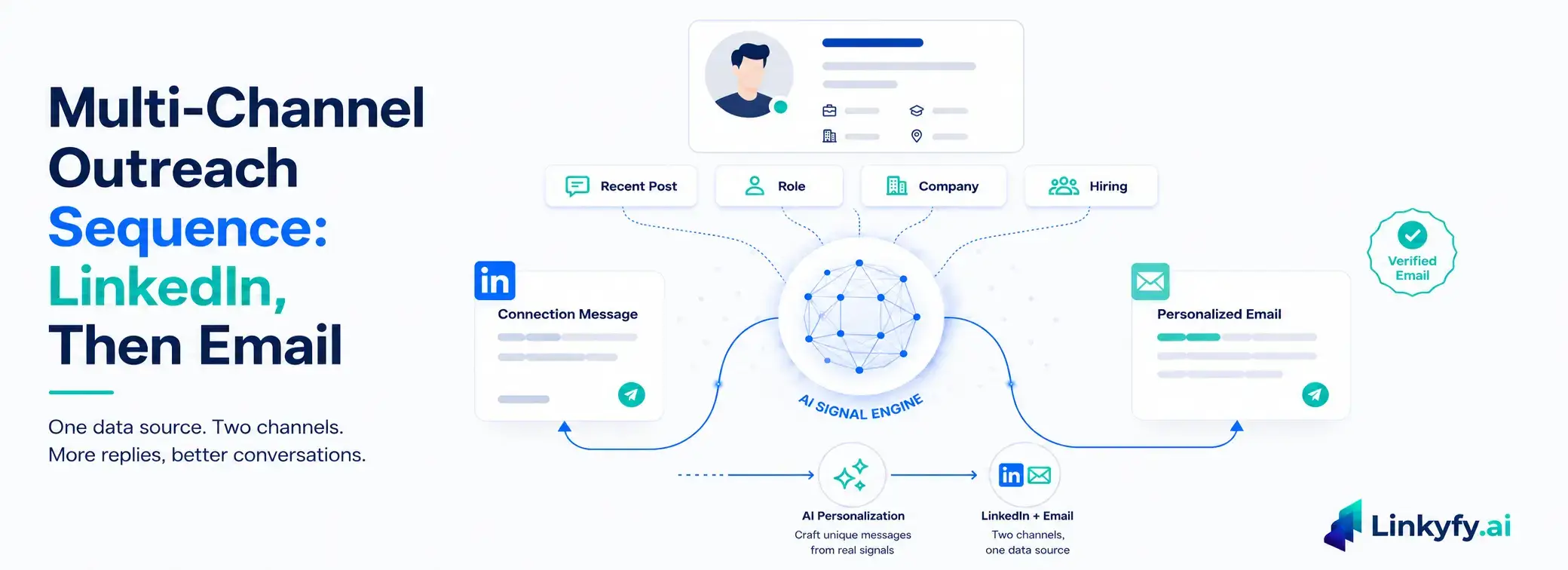
- Writing the LinkedIn message. Each prospect gets a connection message built from real profile signals – recent activity, role, company context – generated fresh, not filled into a template. A message that references what someone posted last week reads differently than one built from a first-name-and-company merge field.
- Sending it safely. The request goes out within smart daily caps – 15–20 connection requests per day on standard use, randomized delays to mimic natural behavior. Nothing fires until an account passes an eligibility check (250+ connections, 1 year of account age), and outreach only runs when the user turns it on.
- Finding the email, without leaving the workflow. This is the part most LinkedIn tools don’t have and most email tools can’t do: a built-in email finder surfaces a verified professional email address linked to the same LinkedIn profile – no separate lookup tool, no enrichment platform bolted on. Every email is pre-verified before use, keeping bounce rates below 3%.
- Writing the email from the same signals. The email isn’t a second campaign built from a different data source. AI analyzes the same profile signals used for the LinkedIn message – role, company, industry, recent activity – and writes a unique email for that recipient: personalized subject line, body, company-specific context.
One Platform Instead of Three
Stitching LinkedIn and email together usually means more than two tools. There’s the LinkedIn tool, the email tool, and then something to bridge them – an automation platform like Zapier, Make, or N8N to move data between the two, plus, for the more advanced setups, a separate enrichment tool like Clay or RB2B to give each channel something real to personalize with.
That’s three or four subscriptions and three or four places for the same prospect’s information to get out of sync. A profile detail that changes on one side doesn’t automatically update on the others, and every new integration is one more thing that can silently break a campaign mid-send.
Linkyfy collapses that stack into one. The LinkedIn Search URL, the connection message, the email finder, and the email copy all pull from the same prospect record inside the same platform – no Zapier workflow moving data between tools, no separate enrichment subscription feeding either channel. LinkedIn profile data doesn’t need to be exported or synced anywhere. It’s already sitting in the one place both channels read from.
What This Looks Like in Practice
Setting this up doesn’t require two separate campaigns or a manual handoff between tools. During campaign setup, selecting “Send Email” in the Outreach Mode step turns on the built-in email finder, which automatically surfaces verified work emails for the same prospect list already being contacted on LinkedIn. AI generates the personalized email copy directly – no editing required before sending, no export, no copy-pasting a spreadsheet between platforms. Email finding and sending limits vary by plan, from Standard through Business Plus.
The result: one prospect list, personalized from one data source, reaching the prospect through two channels without ever leaving the same workflow.
What the Data Shows
Follow-up sequences that span more than a single send consistently outperform one-shot outreach – sequences with follow-up touches drive 2–3x more replies than a single message alone. This lines up with broader industry data too: a 2026 B2B sales benchmark analysis found that outreach sequences combining LinkedIn and email generate significantly higher engagement than email alone – a pattern consistent with what shows up inside this specific sequence. On the LinkedIn side, this workflow structure supports 85%+ response rates and 3X higher replies compared to generic templated outreach. On the email side, AI-personalized subject lines built from real profile context see 55–60% open rates and 22–25% reply rates, well above what static CSV-based cold email typically achieves.
None of that comes from sending more messages. It comes from making sure the message a prospect eventually sees – on whichever channel they actually check – was built from something real about them.
- Linkyfy.ai's multi-channel outreach sequence runs LinkedIn discovery, AI-personalized connection requests, and a built-in email finder in one connected workflow - no CSV exports or manual handoffs between tools.
- The sequence uses live LinkedIn profile data (role, company, recent activity) as the personalization source for both the LinkedIn message and the follow-up email, achieving 85%+ LinkedIn response rates and 22–25% email reply rates. Sequences with follow-up touches drive 2–3x more replies than single-touch outreach.
Frequently Asked Questions about Multichannel Outreach
How does multi-channel outreach actually work between LinkedIn and email?
The sequence starts on LinkedIn – a personalized connection request built from a prospect’s profile signals. If that goes unanswered, a built-in email finder surfaces the same prospect’s verified work email, and an AI-personalized email follows using the same profile data, reaching them through whichever channel they respond to first.
Do I need a separate tool to find email addresses for LinkedIn prospects in Linkyfy?
No. Linkyfy has built-in email finder which provides verified professional emails linked to LinkedIn profiles directly inside the same platform, with every email pre-verified before sending to keep bounce rates below 3%.
Why does personalization from LinkedIn data outperform personalization from an email list?
Static list personalization typically uses fields like first name, company, and industry – the same fields regardless of what’s actually happening with the prospect right now. LinkedIn-sourced personalization pulls from live signals – recent posts, role changes, company activity – giving the AI real, current context to write from instead of a fixed template.
Should you start a multi-channel outreach sequence with LinkedIn or email first?
LinkedIn first. Starting there means the connection message and any profile signals gathered – role, recent activity, company context – carry over and become the actual personalization source for the email that follows, rather than running two disconnected campaigns built on different information.
Do I need to run separate campaigns for LinkedIn and email outreach in Linkyfy?
No. In Linkyfy.ai, if you are in a paid plan, selecting “Send Email” during campaign setup activates the built-in email finder for the same prospect list already being reached on LinkedIn – one list, one data source, two channels, without exporting or switching tools.
